Improving locations in Pixelfed
In my opinion, one of the biggest missing annoyances is its reliance on a static cities.json to pre-load locations into a database. This means that more obscure locations cannot be found. Since I'm running my own instance, I figured I'd give it ago to correct this.

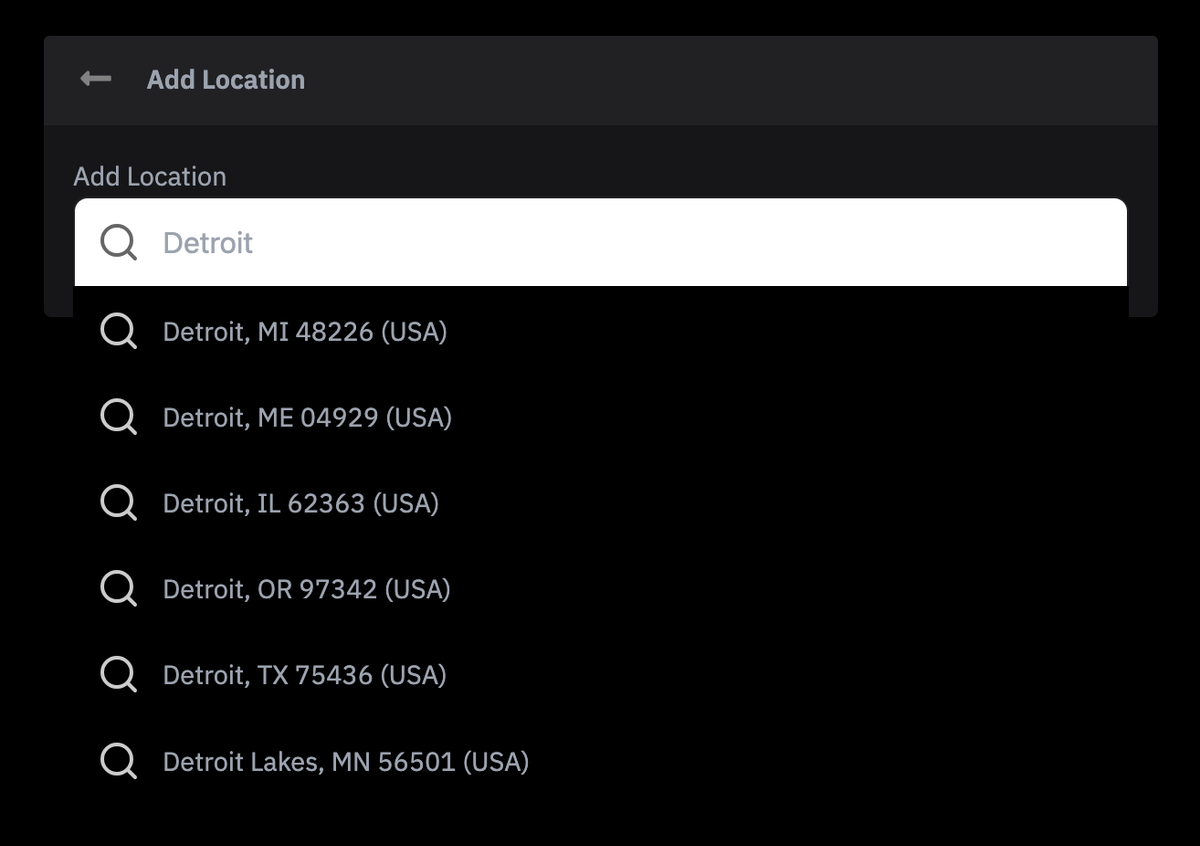
In my opinion, one of the biggest missing annoyances is its reliance on a static cities.json to pre-load locations into a database. This means that more obscure locations cannot be found. Since I'm running my own instance, I figured I'd give it ago to correct this.
First, we have to identify the workflow. There are two entry points for location information: one on post creation and one on post modification. The underlying mechanism is the same, with the only difference being the file and method that does the final storage into the database.
Let's start with the modal partial that presents the user with a search box.
<autocomplete
    :search="locationSearch"
    placeholder="Search locations ..."
    aria-label="Search locations ..."
    :get-result-value="getResultValue"
    @submit="onSubmitLocation"
>
</autocomplete>
<script>
    // ...
    locationSearch(input) {
    	if (input.length < 1) { return []; }
		let results = [];
		return axios.get('/api/compose/v0/search/location', {
			params: {
				q: input
			}
		}).then(res => {
			return res.data;
		});
	},
	getResultValue(result) {
		return result.name + ', ' + result.country
	},
	onSubmitLocation(result) {
		this.fields.location = result;
		this.tabIndex = 0;
	},
</script>
PostEditModal.vue
So let's unpack what's happening here. There's a form object that triggers an internal API call (the one used for post creation), displays a concatenated string but submits a full object stored in the .location field. I didn't want to edit any .vue files, due to my own personal inexperience with that JS framework but also because I didn't want to have to deal with the hassle of rebuilding. I decided instead to hijack that internal API call.
# php artisan route:list | grep location
  GET|HEAD api/compose/v0/search/location .... ComposeController@searchLocation
That controller's searchLocation function searches the Place table in the database, which was pre-loaded with a static file. I modified that function to instead call my mapping provider. I'm using HereMaps which includes an autocomplete endpoint. This is a form so I didn't want to do a full location query just yet.
public function searchLocation(Request $request) {
    abort_if(! $request->user(), 403);
    $this->validate($request, [
        'q' => 'required|string|min:2|max:100',
    ]);

    $q = trim($request->input('q'));
    // $country = 'USA'; // bias to US for testing purposes
    $country = $request->input('country');  // Optional filter

    $result = $this->heremaps->autocomplete($q, $country);
    if (! $result || empty($result)) {
        return [];
    }
    return response()->json($result);
}
ComposeController.php
There are a few ways to inject a service into this class; I opted to add it to the constructor, hence I'm able to $this->heremaps. I created a service for this provider and added the autocomplete method that would return an object for the form.
class HeremapsService
{
    public function autocomplete(string $query, ?string $country = null): ?array
    {
        $params = [
            'q' => $query . '*',
            'apiKey' => config('services.here.api_key'),
            'limit' => 10,
            'types' => 'city',
        ];
        if ($country) {
            $params['in'] = 'countryCode:' . strtoupper($country);
        }
        $response = Http::get(config('services.here.autocomplete'), $params);
        $data = $response->json();
        $items = $data['items'] ?? [];

        return collect($items)
            ->map(function ($item)) {
                return [
                    'hereId' => data_get($item, 'id'),
                    'name' => data_get($item, 'address.city').', '.data_get($item, 'address.stateCode').' '.data_get($item, 'address.postalCode'),
                    'country' => data_get($item, 'address.countryName'),
                ];
            })
            ->take(10)
            ->values()
            ->all();
    }
}
HeremapsService.php
The addition of hereId is key as the mapping provider has a UUID for these locations already, but of course it's not meaningful to the app... yet. I formed the name field to include state and zip code to help the user disambiguate further (yet another annoyance of the static cities.json file.
This would all be coalesced into the .location object on form submission. Let's now go to the controller of that modal.
# php artisan route:list | grep PUT
    PUT api/v1/statuses/{id} .... StatusEditController@store

// StatusEditController.php
public function store(StoreStatusEditRequest $request, $id) {
    $validated = $request->validated();
    // ...
    if (isset($validated['location']['hereId'])) {
        $placeId = $heremaps->updateOrCreatePlace($validated['location']['hereId']);
        $validated['location']['id'] = $placeId;
    }
    // ...
}
What this store function is now doing is taking the form object and doing an upsert based on the UUID. Once the database entry has been found (or created), the database ID is appended to the validated request object. It's important here to make the necessary removals to rules() in StoreStatusEditRequest to allow for an object that could potentially have no ID as when the form is first submitted.
There is a separate service UpdateStatusService that we don't have to modify at all; it takes the decorated location object and sets the place_id field on the Status object before saving it to the database.
The only piece missing aside the actual upsert function in the mapping service is to run a migration that adds the desired fields to the Place table. That really all depends on what you want to store. I decided to save an external_id (though looking back I neglected to also store external_vendor <oops>) which would be used as the lookup column by the forms, but we still want to store a more fully fleshed out object.
public function lookup(string $hereId): ?array
{
    $response = Http::get(config('services.here.lookup'), [
        'id' => $hereId,
        'apiKey' => config('services.here.api_key'),
    ]);

    $item = $response->json();
    return [
        'hereId' => data_get($item, 'id'),
        'city' => data_get($item, 'address.city'),
        'state' => data_get($item, 'address.state'),
        'stateCode' => data_get($item, 'address.stateCode'),
        'postalCode' => data_get($item, 'address.postalCode'),
        'country' => data_get($item, 'address.countryName'),
        'latitude' => data_get($item, 'position.lat'),
        'longitude' => data_get($item, 'position.lng'),
    ];
}

public function updateOrCreatePlace(string $hereId): ?int
{
    return \DB::transaction(function () use ($hereId) {
        $lookupData = $this->lookup($hereId);
        if (! $lookupData) {
            return null;
        }

        return Place::updateOrCreate(
            ['external_id' => $lookupData['hereId']],  // Unique HERE ID
            [
                'name' => $lookupData['city'],
                'state_code' => $lookupData['stateCode'],
                'slug' => \Str::slug($lookupData['city'].'-'.$lookupData['stateCode']),
                'postal_code' => $lookupData['postalCode'],
                'country' => $lookupData['country'],
                'latitude' => $lookupData['latitude'],
                'longitude' => $lookupData['longitude'],
            ]
        )->id;
    });
}
HeremapsService.php
And that's basically it. There's a similar store function that must be done for the creation modal, but the work is done. So the steps are
1) acquire an external mapping vendor API key and add it and the endpoints to config
2) update the post create/edit modals to use the vendor autocomplete to decorate the submitted form with the vendor ID
3) migrate the Place table to include the vendor ID and other fields you may want to save from the vendor response
4) upsert object into the Place table on form submission, decorate with the database ID so that the Status can be associated with that Place